


Spreo vs Miro: which is better for agile teams?
Miro is a visual collaboration platform — an “AI Innovation Workspace” — used by 100 million people for everything from product roadmaps to AI workflows. Spreo is an online whiteboard purpose-built for agile teams: retrospectives, sprint planning, backlog estimation, and team health checks. Both are good tools. They’re built for different things.
Miro is for product, design, and strategy teams who need a platform that does everything. Spreo is for Scrum Masters, Engineering Managers, and agile practitioners who need meetings that run well — without configuring a general-purpose canvas to do it.
What is Spreo?
Spreo is an online whiteboard for agile teams — a visual canvas purpose-built for retrospectives, sprint planning, backlog estimation, team health checks, and workshops.
It’s been used by over 125,000 agile teams since 2019. The people who adopt it are typically Scrum Masters, Engineering Managers, and Agile Coaches who run these meetings every sprint and want a tool that makes facilitation easier.
What is Miro?
Miro is a visual collaboration platform — they describe themselves as an “AI Innovation Workspace.” It’s built for product development, design, AI workflows, strategic planning, and agile — among many other use cases.
Miro serves product teams, designers, strategists, and enterprise organisations. It has 250+ integrations, 5,000+ community-submitted templates, AI agents, and interactive prototypes. Agile meetings are one use case in Miro’s platform.
Spreo vs Miro: see the difference
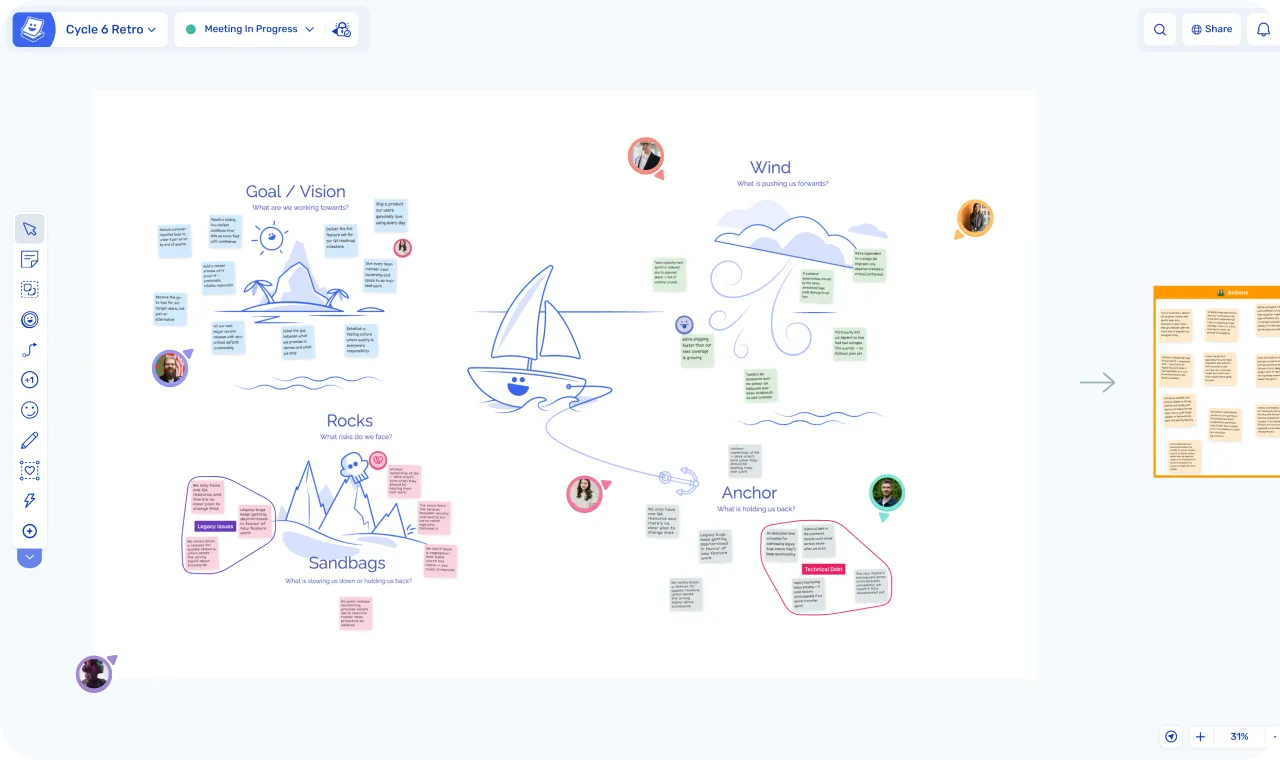
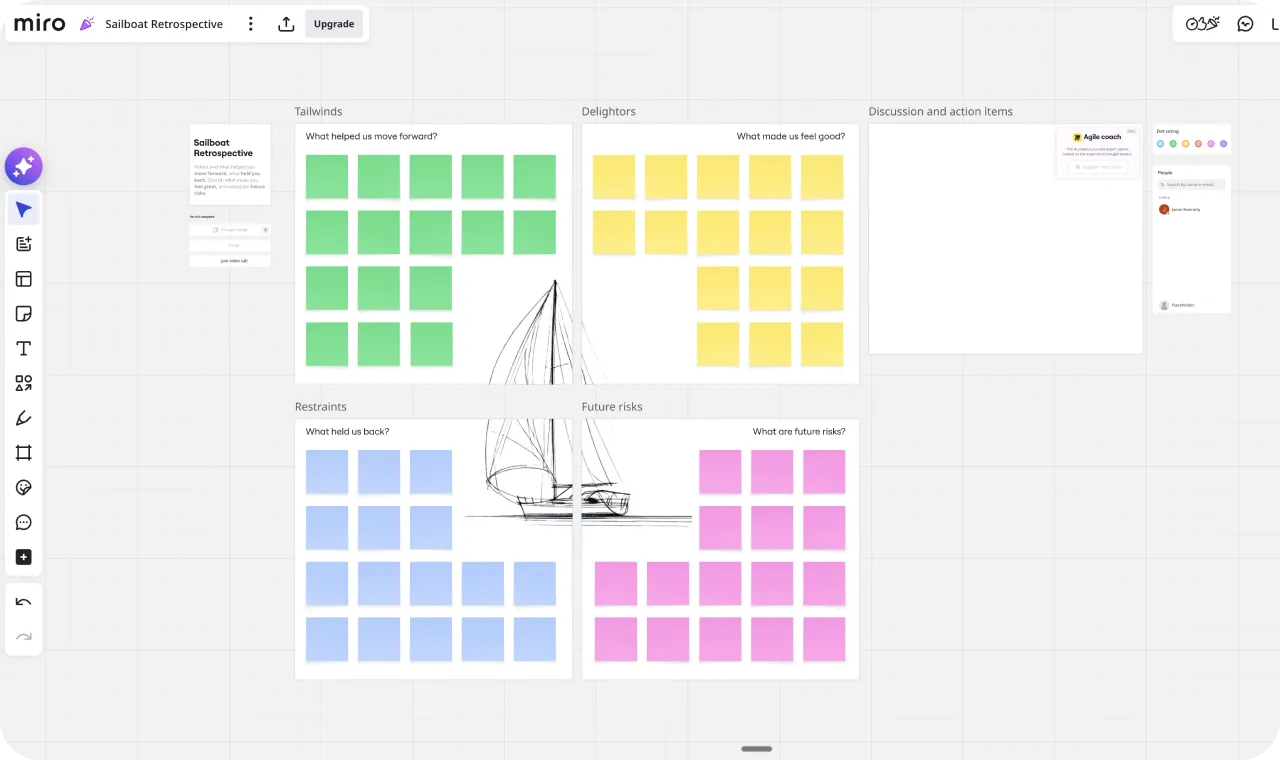
| Spreo | Miro | |
|---|---|---|
| Category | Online whiteboard for agile teams | Visual collaboration platform / AI Innovation Workspace |
| Starting price | $4/member/month, billed annually (30-day free trial) | $8/member/month, billed annually (free plan: 3 boards) |
| Free visitors | Read-only viewers on every plan; 2 guests/board on Business; unlimited on Consultant plan | Visitors can edit boards without a paid seat |
| Facilitation | Meeting Mode with host controls: private writing on by default, per-person reveal, Ready Check, Activity Frames, participant tool control | Partial Private mode, voting, timer, hidden frames, content locking, attention management. No ready check or per-person reveal |
| Action tracking | Yes Built-in: assignees, due dates, email reminders, team dashboard, carry-forward | Partial Cards with an assignee and due date. No cross-board dashboard or carry-forward |
| Grouping | Topics tool: labelled groups that move as one, with AI grouping | Frames and manual arrangement, plus AI clustering |
| Jira integration | Yes Two-way (Business, $6/member/month) | Yes Two-way, plus dependency mapping (Business, $20/member/month) |
| Templates | 125+ curated for agile meetings | 5,000+ community-submitted via Miroverse (quality varies) |
| AI | AI-assisted sticky grouping | Flows, Sidekicks, clustering, summaries, image generation, prototypes |
| Works with AI assistants (MCP) | Yes Included on every plan | Yes Available on all plans, including free |
| Integrations | Jira | 250+ apps |
| Engagement | Icebreaker games, jukebox, spinner, buzzer, voter panels, object trays, polls, confetti, hats | Reactions (6 emojis), hand raising, spinner wheel, alignment scale, flip cards, polls |
| Enterprise | SSO, team spaces, guest access controls, EU hosting | SCIM, data residency, audit logs, portfolio management, governance |
The short version
Miro is the bigger tool by a distance. It has roadmaps, prototypes, AI workflows, and the governance a large enterprise asks for. If you need one workspace for product, design, and strategy, choose Miro.
Spreo does a narrower job: the meetings an agile team runs every sprint, starting with retrospectives, which is what it was originally built for. Start a meeting and private writing is already on. Everyone reveals their own notes when they’re ready, a Ready Check shows who has finished before you move on, and the actions you agree are assigned, chased by email, and ready to pull into the board at the next retro.
You can run a retro in Miro, and plenty of teams do. One customer who had used both described the trade-off better than we can:
“Miro is a great team whiteboarding tool overall. However, its flexibility when it comes to doing something that is structured by methodology (like retros) is somewhat its bane. It’s like a Swiss army knife — you surely can use it to open a bottle of wine, but there are designated tools to open bottles and it will be easier to use them instead.”
— Anonymous customer (previously used Miro and Parabol)
Where the two differ
Facilitation: similar tools, different defaults
Miro’s paid plans cover more of a retro than people expect. There’s private mode with a host-controlled reveal, anonymous timed voting with a cap on votes per person, a countdown timer with music, hidden frames, content locking, and “Bring everyone to me”. They work, and you can run a good retro with them.
In both tools the facilitator runs the meeting. Neither one walks the team through it. What differs is how much is already set up when you start, and a few controls Miro doesn’t have.
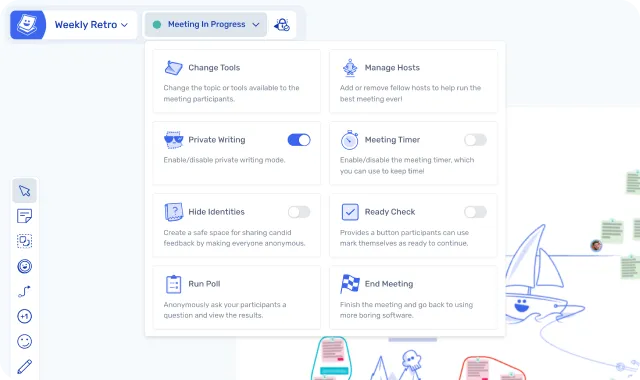
Click Start Meeting in Spreo and private writing switches on, the board layout locks so nobody drags a zone by accident, and participants’ toolbars change to the collaboration tools. Each person reveals their own notes when they’re ready, one at a time if they like, and the host can reveal a straggler’s. In Miro, ending private mode reveals everyone’s notes at once.
Ready Check gives each participant a button to say they’ve finished, so you aren’t asking “is everyone done?” into silence. Activity Frames keep later exercises hidden until you want them, and one click herds the whole group to the next one. You can also change which tools participants have partway through, add a second host, or turn on Hide Identities for a single exercise.
”Spreo has the best tools for the facilitator, it’s better than Miro, for instance. When you invite customers to your Spreo board, you don’t have to explain how to use Spreo, it is much simpler.”
— Nadine Porkert, Agile Coach, XITASO
Actions that outlive the meeting
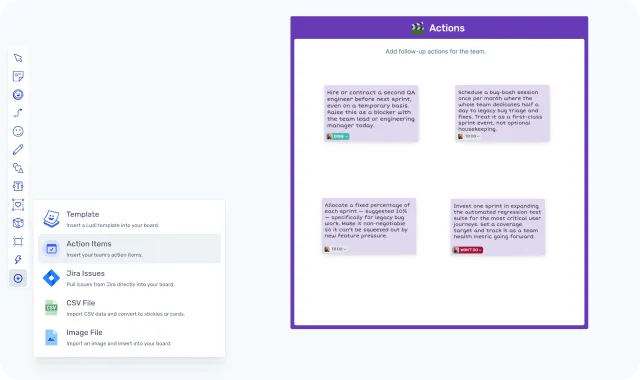
In Spreo, any sticky note can become an action with an owner and a due date. The owner is emailed when it’s assigned, as the date approaches, and again if it goes overdue. Every action also appears in a team-wide action tracking dashboard, where you can filter, edit, and batch-update them between meetings.
At the next retro you import the open actions into the new board, where they stay synced with the originals. The session starts with what the team said it would do last time. On the Business plan, an action can also become a Jira issue.
Miro’s nearest equivalent is the card. Switch a sticky note to a card and you can give it an assignee and a due date. The card stays on the board it was made on, though. There’s no list of actions across boards and nothing that brings last sprint’s actions into the next retro, so follow-up depends on someone remembering to go back and look.
If the same actions keep reappearing in your retros, this is the difference you’ll notice first.
Sprint planning with Jira
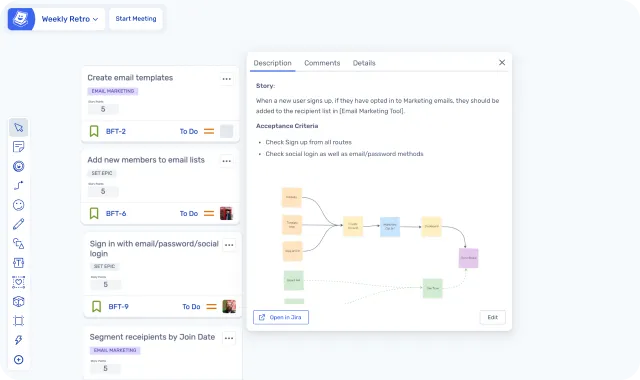
Both tools connect to Jira in both directions, and the core workflow is the same in each: pull backlog items onto the board, estimate together, send the results back. With Spreo’s Jira integration you can also edit the fields on a Jira card, bulk-update several at once, and turn sticky notes into new issues without leaving the board. Planning poker is built in, with Fibonacci or T-shirt sizing.
Miro goes deeper into Jira. It has a Dependencies app for mapping relationships between issues, widgets that update Jira fields automatically, and Miro boards can be embedded inside Jira issues. If that depth is what you need, Miro is the better choice.
For a straightforward estimate-and-commit session, Spreo covers the workflow on a plan that costs less than a third as much. The numbers are in the pricing section below.
Templates: curated or crowdsourced
Miroverse has more than 5,000 community templates, including some from well-known agile practitioners and consultants. If you rotate formats every sprint and enjoy browsing, there’s more to find there.
Spreo has 125+ templates, curated and designed for agile meetings, with one per format. The trade-off is choice against speed. With a single sailboat retrospective template, there’s nothing to compare before you start.
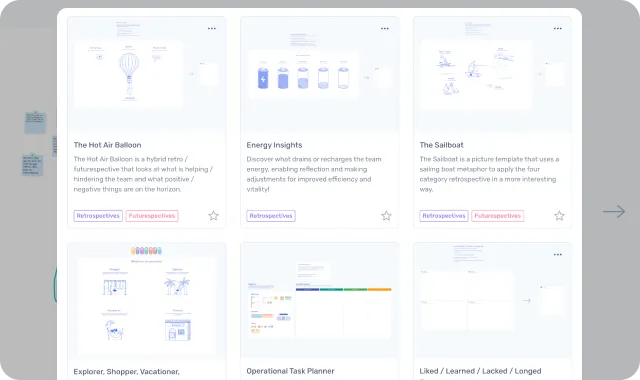
”When you search sailboat on Miro you get 9 results and have to pick the one you want to use.”
— Monika Golgowski, Agile Coach, Technical University of Munich
Built for the people in the meeting
Most people in a retro didn’t set up the board, and some have never seen the tool before. In Spreo, double-clicking anywhere makes a sticky note, and it takes the colour of the zone it lands in. Each person writes in their own handwriting font, so you can scan the board and see who said what. We wrote up the thinking behind these choices in the design of a digital sticky note.
Miro is built around the person making the board, with a far bigger toolset for layouts, diagrams, and workflows. For a product roadmap that’s what you want. In a 60-minute retro, time spent finding the right tool is time taken from the conversation.
Then there’s the part that looks frivolous. Spreo has interactive icebreaker games, a jukebox that plays music to the whole board, a spinner, a buzzer, a confetti cannon, and hats for your avatar. Miro has live reactions, hand raising, a spinner wheel, an alignment scale, flip cards, and polls, and they’re useful too. We go further because people say more in a meeting they’re enjoying.
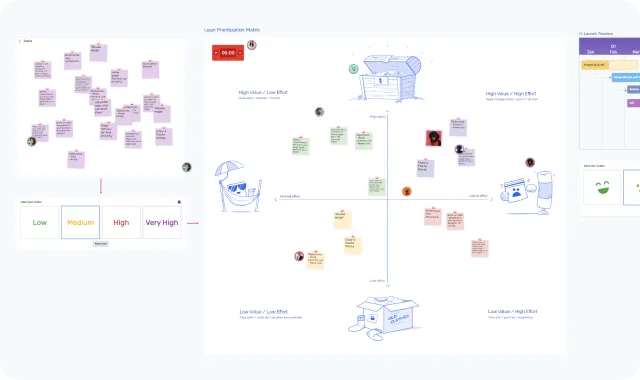
”I really don’t like Miro, it’s so uninspired. Spreo is so much better for it. They reinvented a few UX things that just makes everything nicer to use. It’s a pleasure and fun to use it. Reminds me about Apple products in the early days.”
— Mathias Nestler, CTO & Co-Founder, AccessOwl
Beyond retros and sprint planning
Workshops and brainstorming
It depends on the workshop. For agile ones, such as project kickoffs, Lean Canvas, or sprint reviews, Spreo’s host controls make it easier to keep a group on the same activity.
For open-ended design workshops, strategy sessions, or cross-functional work that needs diagrams, prototypes, and links to design tools, Miro’s broader canvas and integrations are the better fit.
User story mapping
Either tool works. Both have story mapping templates and a Jira integration. Spreo’s is simpler: you work inside a template built for the job, and stories become Jira issues from the board. Miro’s is more flexible, with room for custom layouts and content from more tools.
For one team’s story map the experience is similar. For a large, multi-team map with many integrations, Miro has more room.
Roadmapping and PI Planning
Miro. Planning at programme level means many teams, dependency mapping, several project management tools, and portfolio views, and Miro is built for that.
Spreo has roadmap templates and a Timeline Frame for laying out work by month, but it’s designed for team-level meetings, not planning across a whole programme.
What Miro does that Spreo doesn't
AI is where Miro is putting most of its effort. It has Flows, Sidekicks, clustering, summaries, image generation, and AI-built prototypes and specs. Spreo’s built-in AI does one thing, which is sorting sticky notes into topics. Both tools also have an MCP server, so you can connect Claude, ChatGPT, or another assistant you already use. Spreo’s MCP server lets it build retros, workshops, mind maps, flowcharts, and roadmaps from a prompt, and read and summarise existing boards.
Miro connects to more than 250 apps, including Figma, Linear, Asana, Microsoft 365, and Google Workspace. Spreo integrates with Jira.
For large organisations, Miro offers SCIM provisioning, data residency, audit logs, and portfolio management. Spreo has SSO, team spaces, and guest access controls, and is hosted entirely in Europe.
Miro also has a free plan with three editable boards. Spreo has a 30-day free trial instead.
Pricing
Spreo starts at $4/member/month (Starter) or $6/member/month (Business, which adds the Jira integration). Miro starts at $8/member/month (Starter) or $20/member/month (Business, which is where its Jira sync sits). All four prices are billed annually.
For a team of 10, that’s $40 a month against $80 on the entry plans, and $60 against $200 with Jira.
There’s one case where Miro works out cheaper. Its paid plans let visitors edit a board without a seat, so a team with one paid seat and nine visitors pays $8 a month. In Spreo, read-only viewers are free, but contributing needs a licence on Starter, and Business allows two guests per board. On the Miro side, visitors can’t create or manage boards, and the facilitation tools need a paid plan.
If everyone on the team needs full access, compare the per-seat prices. Spreo is half the price.
| Spreo Starter | Spreo Business | Miro Free | Miro Starter | Miro Business | |
|---|---|---|---|---|---|
| Price (billed annually) | $4/member/month | $6/member/month | Free (3 boards) | $8/member/month | $20/member/month |
| Private writing | Yes | Yes | No | Yes | Yes |
| Voting | Yes | Yes | No | Yes | Yes |
| Cross-board action tracking | Yes | Yes | No | No | No |
| Jira sync | No | Yes Two-way | No | No | Yes Two-way |
| Planning poker | Yes | Yes | No | Yes | Yes |
What customers say
Andrew Burns (switched back from Miro)
Andrew’s team used Miro for retros during a gap while waiting for their Spreo licence:
“We love Miro, but it was killing us for retros. I don’t want to talk badly about Miro because I think it’s a good product. However Miro is a poor experience for retros, at least compared to Spreo. So I am glad we no longer have to use Miro!”
Tim Gaye, Senior Software Engineering Manager, Kaluza
At Kaluza, Tim was asked why his teams weren’t just using Miro:
“I was chatting to some leadership the other day about ‘why have you bothered with Spreo? Why don’t you just use one of our bigger more general tools like Miro?’ And it’s the little things for me. It’s not the big moves or big functionality. It’s almost the little things that make me think you’ve thought about how people want meetings to flow, how people use it.”
Can you use both?
Miro for product work, Spreo for the meetings
Yes, and several of our customers do. Meltwater split its tooling on purpose: Miro went to product marketing for large initiatives with many stakeholders, and engineering runs its day-to-day sessions in Spreo. XITASO has a similar split, with usability engineers using Miro for wireframes and workflow diagrams while the agile coaches run their facilitated sessions in Spreo.
Others move over completely. Bernhard Unger-Weber, Scrum Master for five remote teams at ryd, switched from Miro to Spreo because he wanted a more focused tool. His teams now run their kickoffs, sprint planning, estimation, and retros in it.
Keeping retros in their own tool has a side benefit. Steffen, from the Digital Product School at the Technical University of Munich, told us: “Having a separate tool for retros helps teams institute retrospectives as a regular practice — otherwise retros get lost in everyday Miro work and aren’t prioritised.”
Trying Spreo doesn’t mean migrating anything. Leave your Miro boards where they are, pick a template for your next retro, and share the link. The 30-day trial has every feature switched on. Alex Imbeaux, Head of Talent Management Products at Lucca, said of the rollout there: “It took like 30 seconds for people to be autonomous on it."
"Miro was being used for more of these larger initiatives that needed a lot of planning involved, maybe a lot of different stakeholders. And people really liked Miro. But then we were realizing that it actually was only used like a one-off, and what we needed as a tool was more of this day-to-day tool. So we transferred Miro to product marketing. For engineering, we were like — Spreo serves all of our purposes. And it’s much simpler to use.”
— Samantha Corbett, Product Manager, Meltwater
Who each tool is for
Choose Spreo if
- You run retros every sprint and want the meeting set up as soon as you click Start Meeting
- Your retro actions keep getting lost between one sprint and the next
- You plan and estimate against a Jira backlog and don’t need dependency mapping
- Everyone on the team needs a full seat and the cost per member matters
Choose Miro if
- You want roadmaps, prototypes, specs, and strategy work in one workspace
- You rely on integrations beyond Jira, or on Miro’s AI features
- Your organisation requires SCIM, data residency, or audit logs
- You run PI Planning or roadmapping across many teams
- You’re a small team that can work with one paid seat and visitors
Final verdict
Miro is the stronger general-purpose platform. If your team needs a single workspace for product development, design, strategy, and AI workflows, it’s a good choice, and Spreo doesn’t try to compete with that breadth.
If what you need is for the sprint’s meetings to run well, Spreo is the better fit. More of the setup is done when the meeting starts, the host has controls Miro lacks, actions get followed up, and a seat costs half as much. Many teams keep both.
Frequently asked questions
Last updated: October 2026. Pricing re-verified against miro.com/pricing and spreo.io in October 2026. Miro features verified against miro.com and help.miro.com in April 2026; MCP details verified against developers.miro.com and docs.spreo.io in October 2026.