



Remote retrospectives are hard.
I wish I could claim otherwise. I wish I could say that you could just organise it, and enjoy the meeting or say something comforting but we both know it’d be BS.
No, they are hard. Like how, no matter what you try, it’s always the same two or three people sharing feedback. Or nobody is speaking at all, and you can’t seem to get anyone comfortable enough to break the silence.
And then there’s getting it all to work. Oh, you know, switching between video conferencing and whiteboards, keeping an eye on the time, and making sure no feedback gets lost.
The good news, as you already know, is that you don’t have to manage all of that on your own. You know there are tools designed to make running remote retrospectives easier.
So, what I’m going to do in this guide, then, is show you the best ones.
Although, before we get to that, I think it’d be best if we covered some basics.
What are retrospective tools?
Well, the first reply that comes to mind is simply that “they are tools to run retrospectives.”
But true as that is, such an answer greatly simplifies several aspects of tools built for retrospectives, so let’s unpack it further.
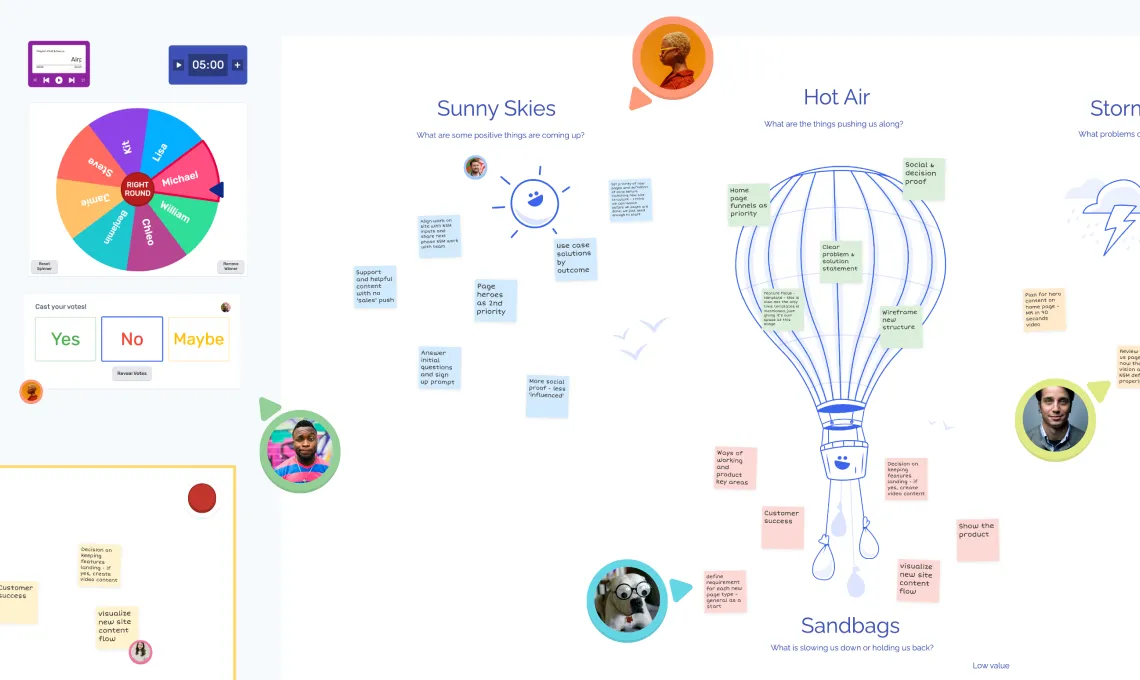
At their core, retrospectives software aims to replace the physical whiteboard and sticky notes you’d use in an in-person retrospective. So, instead of adding feedback to a shared board, your team can do that on their computer screens.
And there is something incredibly significant about that. You see, these tools don’t require everyone to be in the same place. With retrospective tools you can run retros remotely or with hybrid team members.
However, retrospective tools solve more than just the location issue. They can help overcome your people’s reluctance to share feedback, for one.
Most retrospective tools let participants write their feedback privately before sharing it with the rest of the team. As a result, they can prepare and spend time formulating their thoughts.
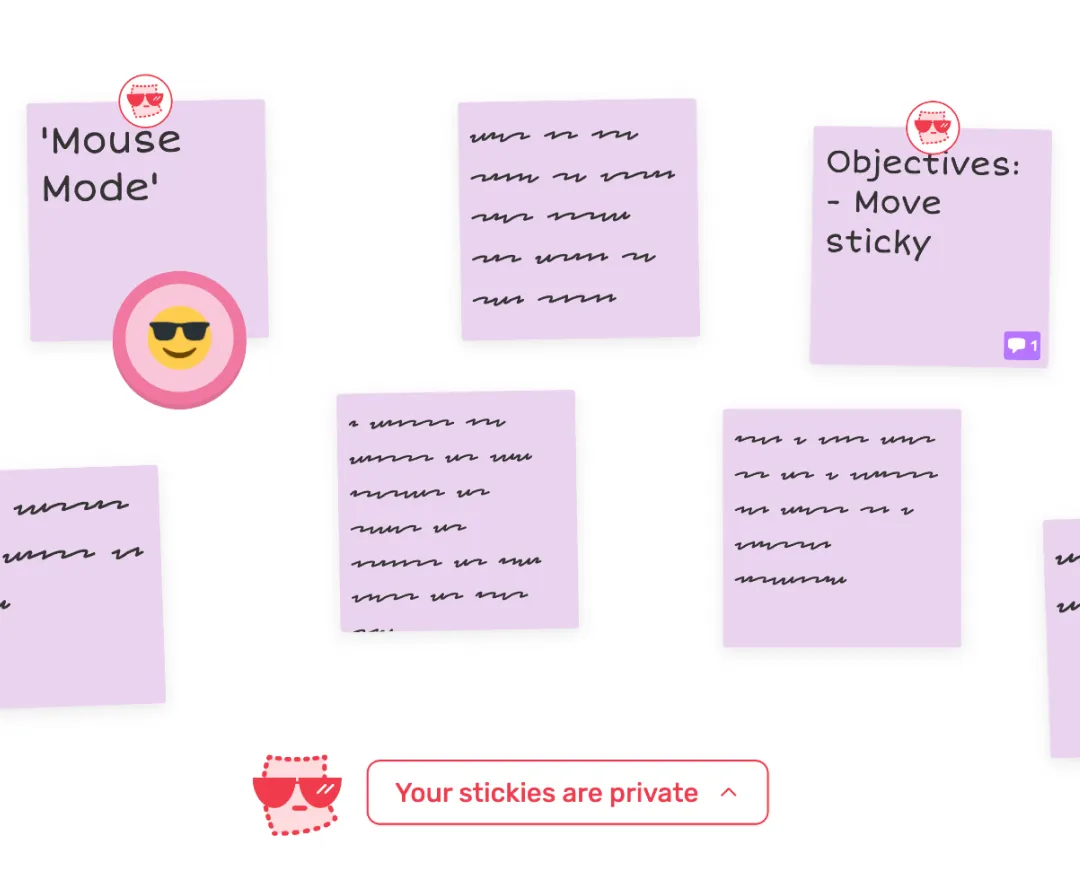
Some tools also support anonymous contributions, which can make it easier to raise sensitive issues without attaching someone’s name to them.
Then there are the facilitation features. Depending on the tool, you can start with a ready-made retrospective template, set timers, organise feedback into topics, run voting sessions, and record action items with owners and due dates.
Some tools also let you bring unfinished actions into the next retrospective or send them directly to Jira and other project management platforms.
One last thing I want to cover is the two types of retrospective tools.
Dedicated retrospective platforms, like Parabol or Retrium, guide the team through the meeting - pretty much following a pre-defined process, from collecting feedback to discussing issues and agreeing on actions.
Whiteboard-based tools, such as Spreo and Miro, give you more freedom to organise and facilitate the meeting yourself.
Neither approach is necessarily better. Which type you choose depends largely on how much structure you want the software to provide and how much control you’d prefer to keep over the meeting.
And there is one other thing - the best retrospective software isn’t necessarily the one with the most templates or features, or one that does more than others.
It’s the one that helps your team have a useful discussion, agree on what needs to change, and actually follow through.
Core features of a typical retrospective tool
Although retrospective tools differ in how they work, most offer a similar set of features to help you prepare, run, and follow up on your meetings.
Here are the main ones to look for:
- Retrospective templates: Ready-made formats such as Start, Stop, Continue, Sailboat, or Starfish. Some tools offer simple column-based templates, while others provide illustrated boards and let you create your own formats.
- Private writing and anonymous feedback: Participants can write their thoughts without everyone else seeing them immediately. Some tools also let people contribute anonymously, so their feedback can’t be traced back to them. Importantly, private writing and anonymity aren’t necessarily the same thing.
- Feedback grouping: Once everyone has contributed, you can organise similar comments into topics. Some tools also use AI to suggest groups, saving you the trouble of sorting through dozens of notes manually.
- Voting: Instead of trying to discuss every comment, participants vote on the issues they consider most important. Tools differ in how many votes people get and whether voting results remain hidden until everyone has finished.
- Facilitation controls: Timers, presentation modes, and controls for revealing feedback or bringing everyone to the same part of the board help you keep the meeting moving. Some tools also guide participants through each stage automatically.
- Action items and follow-up: You can turn feedback into actions, assign owners, and set due dates. Some platforms also bring unfinished actions into the next retrospective, so they don’t simply disappear after the meeting.
- Integrations: Many tools connect with platforms such as Jira, Linear, and Azure DevOps, allowing teams to transfer retrospective actions into their existing workflows.
How I selected and compared these tools
For this guide, I selected six tools that approach retrospectives in different ways. Some are simple column-based boards, others are dedicated platforms that guide you through the entire meeting.
Because of that, I decided not to focus on comparing feature lists. Each of these tools approaches retrospectives differently, after all. Instead, I focused on what each tool actually lets you do when preparing and facilitating a retrospective.
Here’s what I looked at:
- Setup and facilitation: I looked at how easy it is to prepare a retrospective and run the meeting. Does the tool guide everyone through fixed steps, or do you control the process yourself?
- Formats and templates: I reviewed what retrospective formats are available. Also, whether you can customize them, create your own, or are you limited to predefined layouts.
- Private writing and anonymity: I evaluated whether participants can write feedback privately before sharing it during the meeting. Also, could they contribute anonymously, and who controls when their notes become visible?
- Grouping, discussion, and voting: Questions I asked here were how easy is it to organise feedback, identify common themes, and prioritise topics for discussion?
- Action items and follow-up: I looked at whether you can assign owners and due dates to items. More importantly, can you easily revisit unfinished actions in the next retrospective.
- Integrations: I reviewed how the tool works with third-party software such as Jira, Linear, or Azure DevOps?
- Engagement: I decided to test what the tool offers to keep recurring retrospectives interesting, from icebreakers and themed templates to other interactive features, too.
- AI capabilities: I tested whether AI can help organise feedback or summarise discussions. Can you connect your own AI assistant, and how much control do you retain over its suggestions?
- Pricing: Finally, I calculated what it actually cost to run retrospectives with a team of eight. I compared free-plan limitations and different pricing models, including per-user, per-team, and per-room pricing.
I also looked at where each tool falls short, because having a particular feature doesn’t necessarily mean it works the way your team needs it to.
Here’s what I found.
6 best retrospective tools
Spreo: best for engaging, whiteboard-based retrospectives
Spreo (formerly Metro Retro) - disclaimer: this is my tool - is an online whiteboard built specifically for the meetings agile teams run regularly, including retrospectives, sprint planning, estimation, and workshops.
And that focus on agile meetings is an important aspect of our tool.
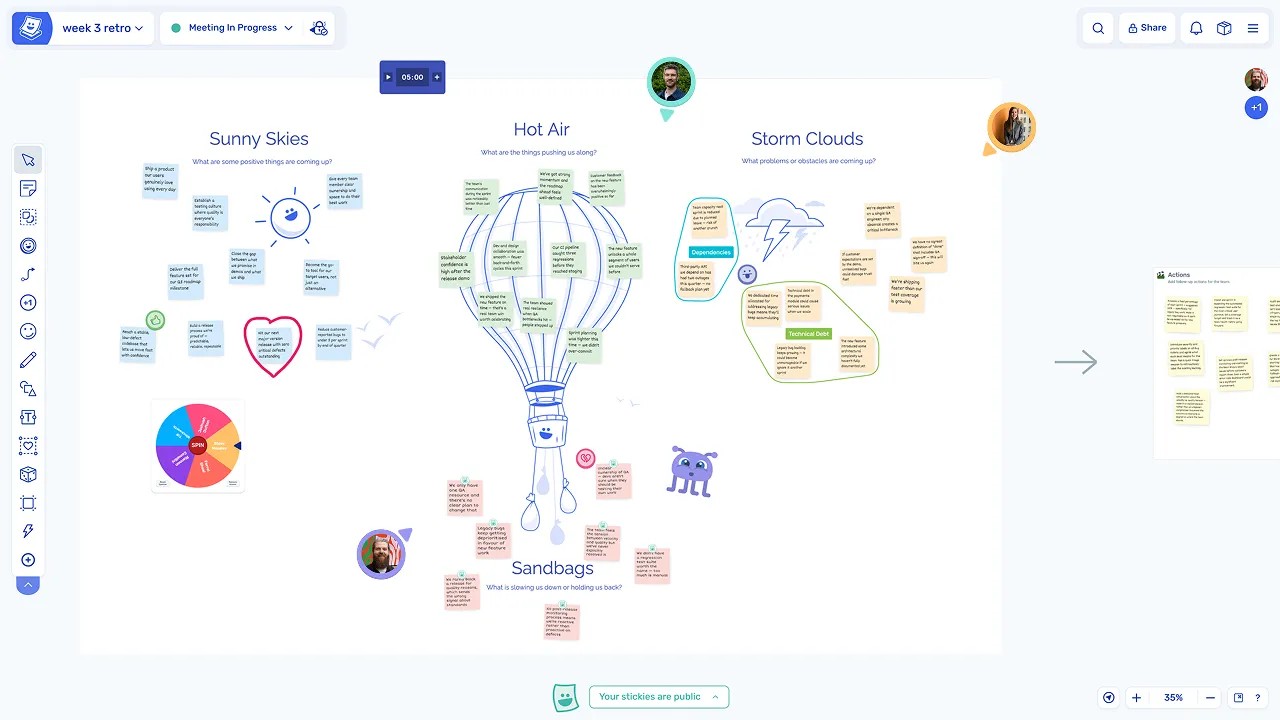
Unlike general-purpose whiteboards, Spreo comes with the facilitation features you need to run retrospectives already built into the board.
You can start with a ready-made retrospective template, collect feedback privately, group related comments, run voting sessions, and turn the team’s decisions into actions.
But there’s another aspect to Spreo that’s worth mentioning.
The tool is designed to make recurring meetings more enjoyable, too. Alongside its facilitation features, it includes illustrated templates, playful interactions, and other little touches intended to keep people engaged rather than drifting off to another browser tab.
Let’s look at how it all works.
Built-in tools for running retrospectives
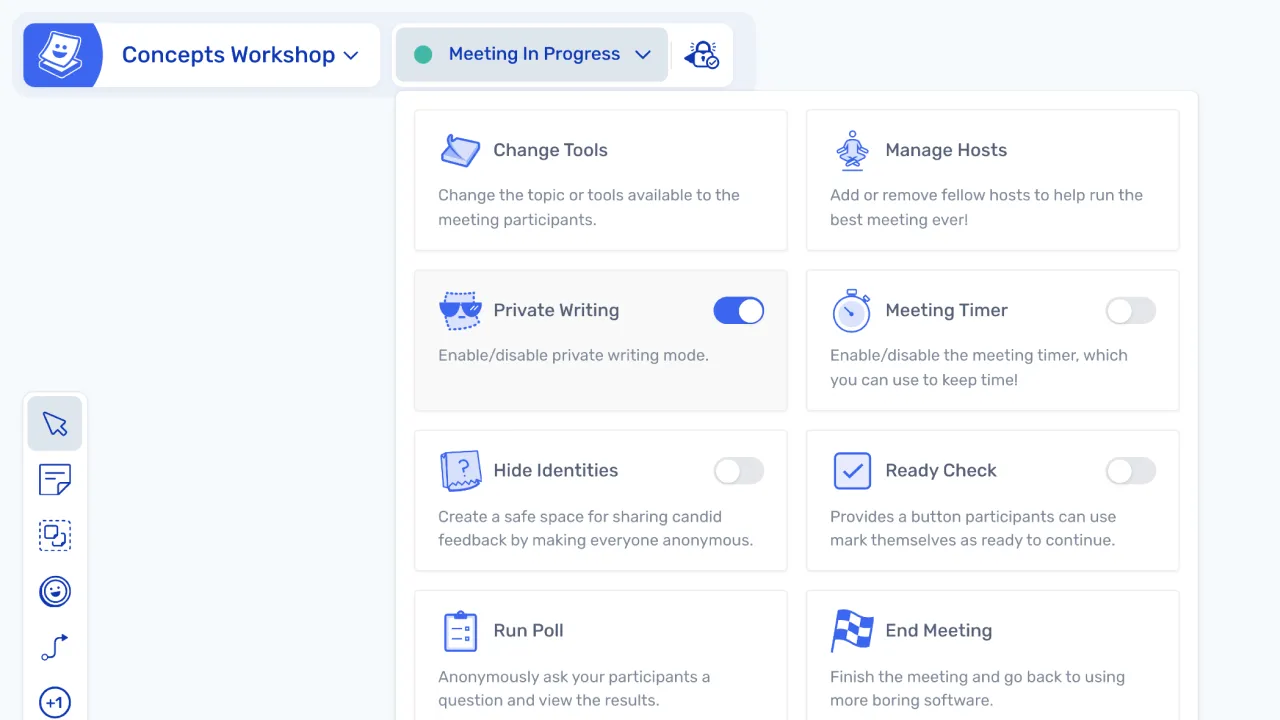
One of Spreo’s main features is Meeting Mode, which gives the facilitator access to a dedicated set of controls for running the session.
These include:
- Private Writing: Participants write their feedback privately before sharing it with the team. Their notes remain hidden from everyone else, including the host, until they’re revealed.
- Hide Identities: Allows anonymous contributions. Anything written or voted on while this mode is active cannot be traced back to a participant.
- Meeting Timer: Helps keep each activity within its allocated time.
- Ready Check: Lets the facilitator check whether everyone is ready to move on.
- Run Poll: Collects responses from participants during the meeting.
- Everyone To Me: Brings everyone to the same location on the board.
There are also tools for organising and prioritising feedback.
For example, you can group related sticky notes into topics yourself, or select a batch of notes and let AI sort them into topics for you.
Then, with Voting Rounds, you can give each participant a set number of votes and let the team decide which issues deserve the most attention.
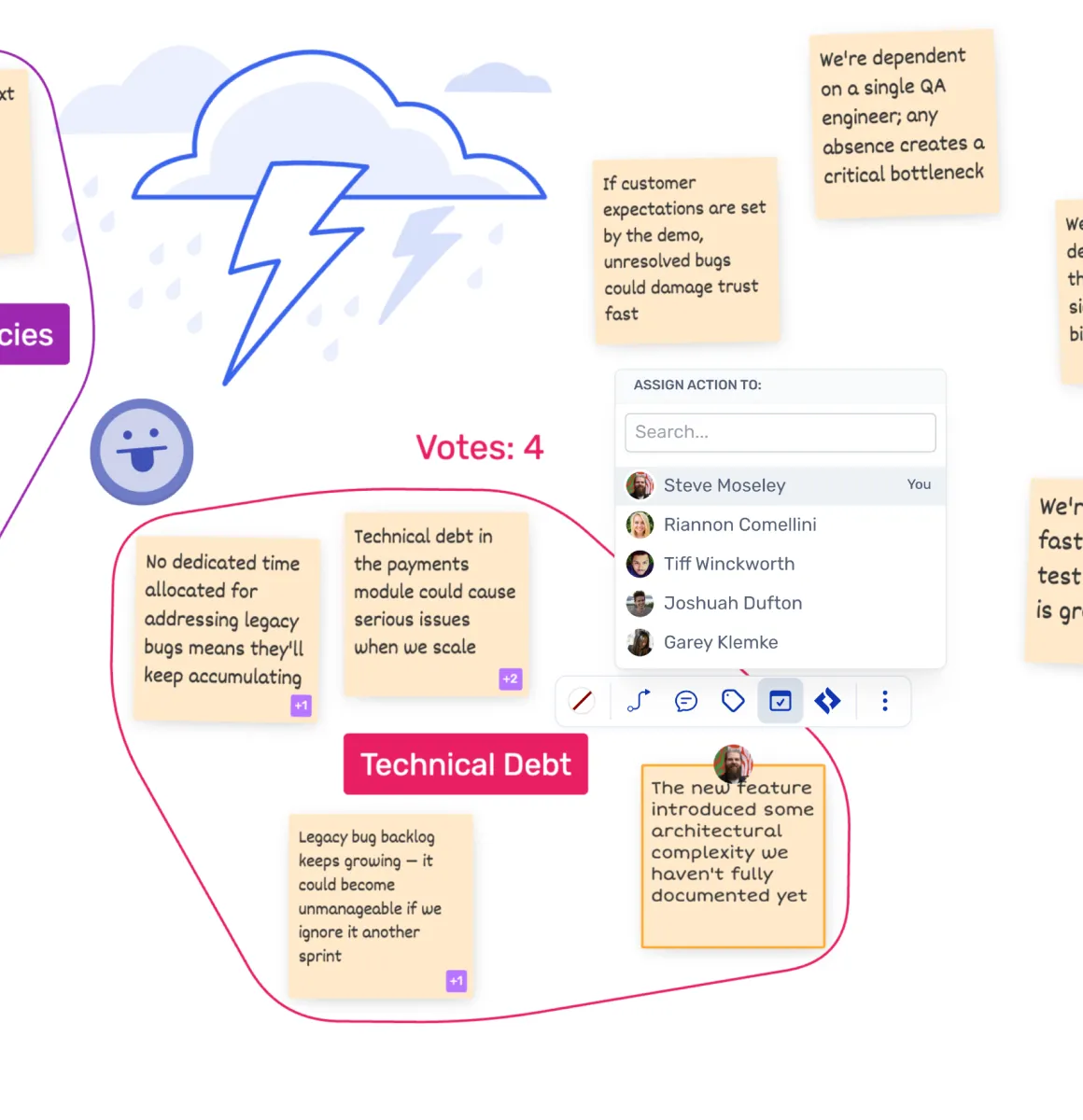
Spreo also includes Activity Frames, which let you hide upcoming activities and reveal them when the team is ready.
This means you can run a retrospective step by step without having to move everyone through a rigid, predefined process.
Templates for different retrospective formats
Spreo offers more than 150 hand-illustrated templates, including 55 specifically for retrospectives.
You’ll find familiar formats such as Start, Stop, Continue and Starfish, alongside more unusual, themed retrospectives such as Zombie Attack! and The Big Christmas Retro.
And these aren’t just ordinary columns with different headings.
For example, a Sailboat retrospective uses an actual sailboat illustration, with the different parts of the scene representing elements of the discussion.
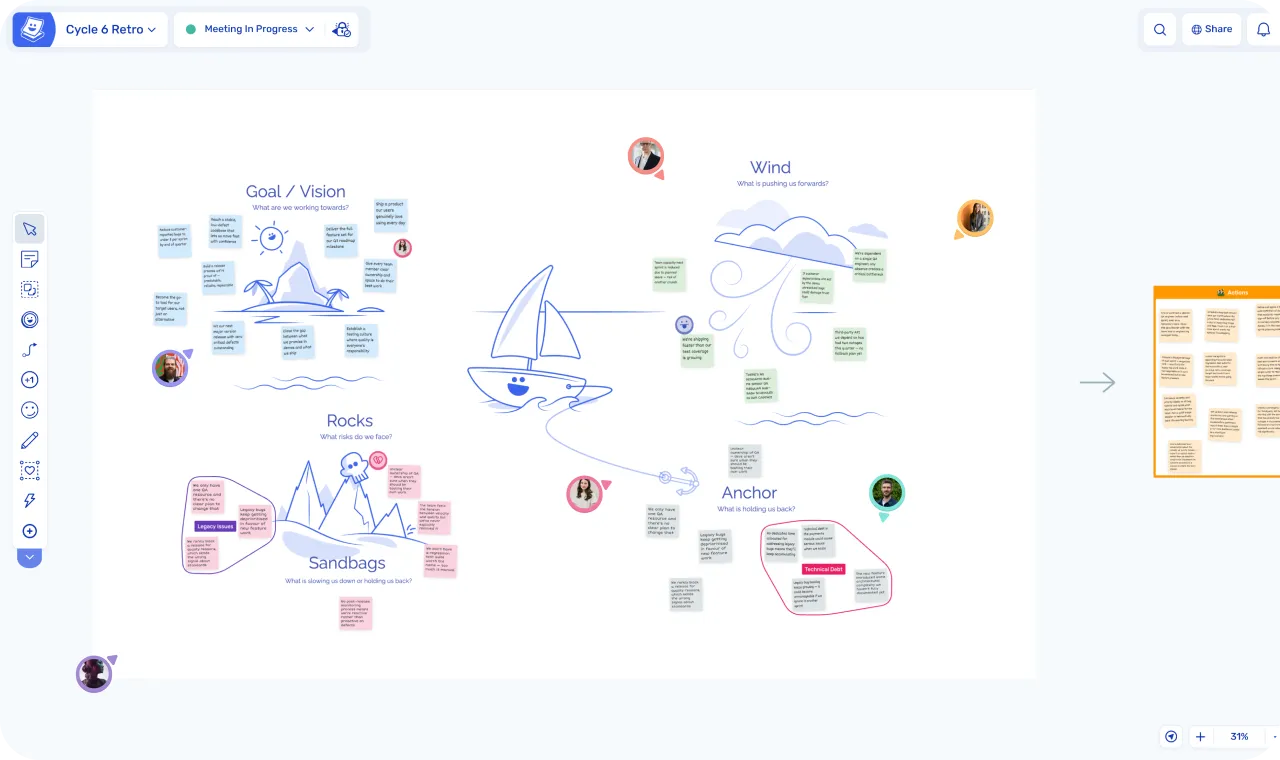
The templates also come with their layouts locked, so participants can’t accidentally move columns or other elements around while contributing.
Of course, you aren’t limited to the supplied formats.
You can change the layout to suit your team, create your own retrospective boards, and save them as templates for future sessions.
Turning retrospective feedback into actions
Here’s something particularly important.
A retrospective isn’t much use if the team identifies problems, agrees on improvements, and then forgets all about them before the next sprint.
Spreo addresses this with built-in action tracking.
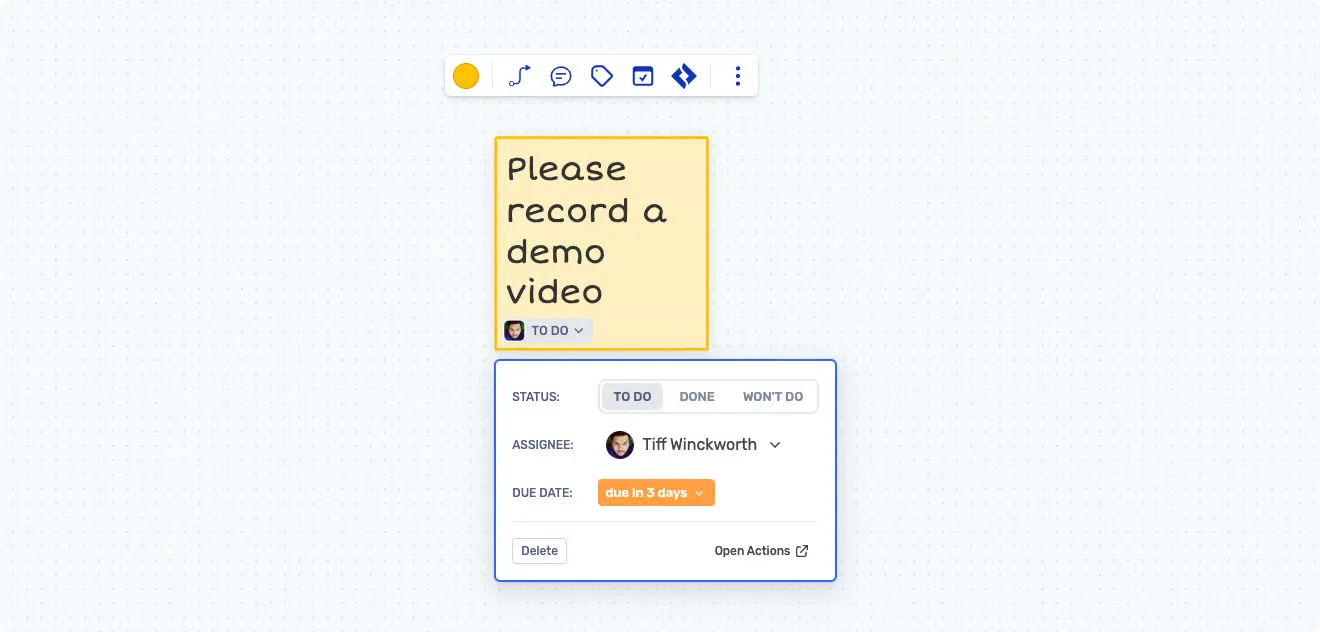
You can turn a sticky note into an action directly on the board, assign an owner, add an optional due date, and track its status.
Those actions also appear in the team’s Action Items dashboard, which brings together outstanding work from different boards.
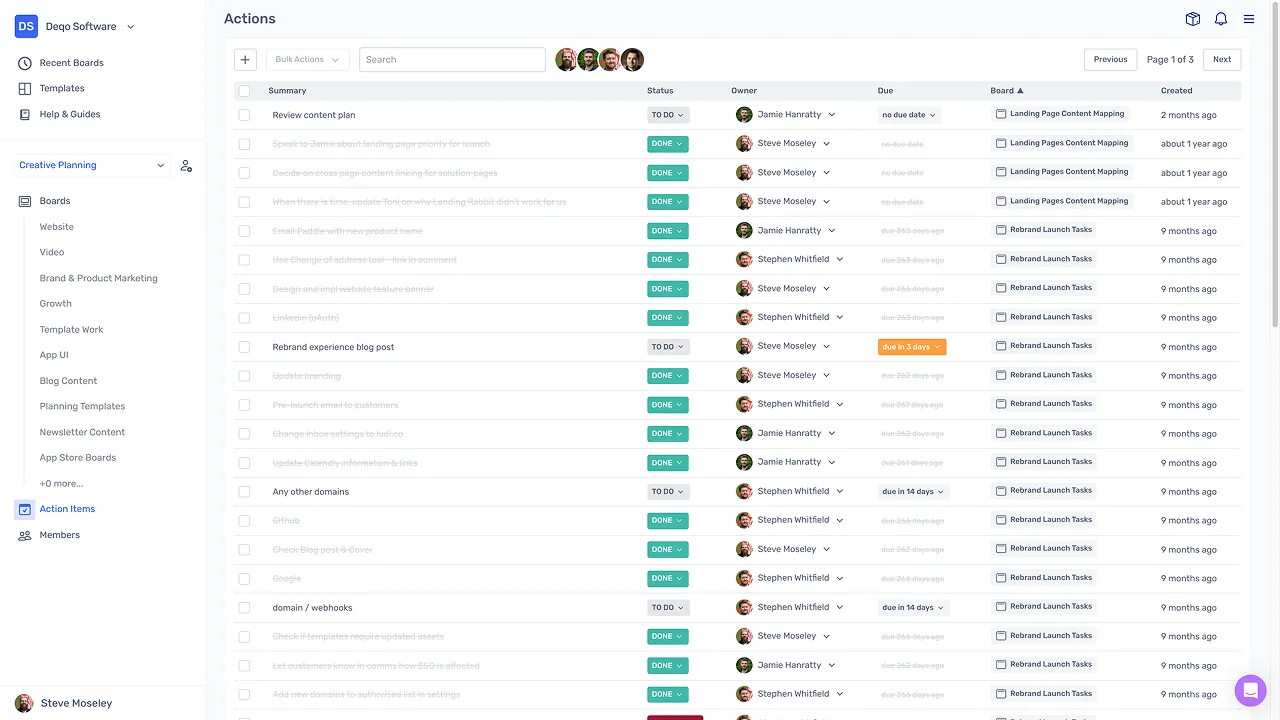
And when it’s time for the next retrospective, you can insert those existing actions into the new board without copying everything over manually.
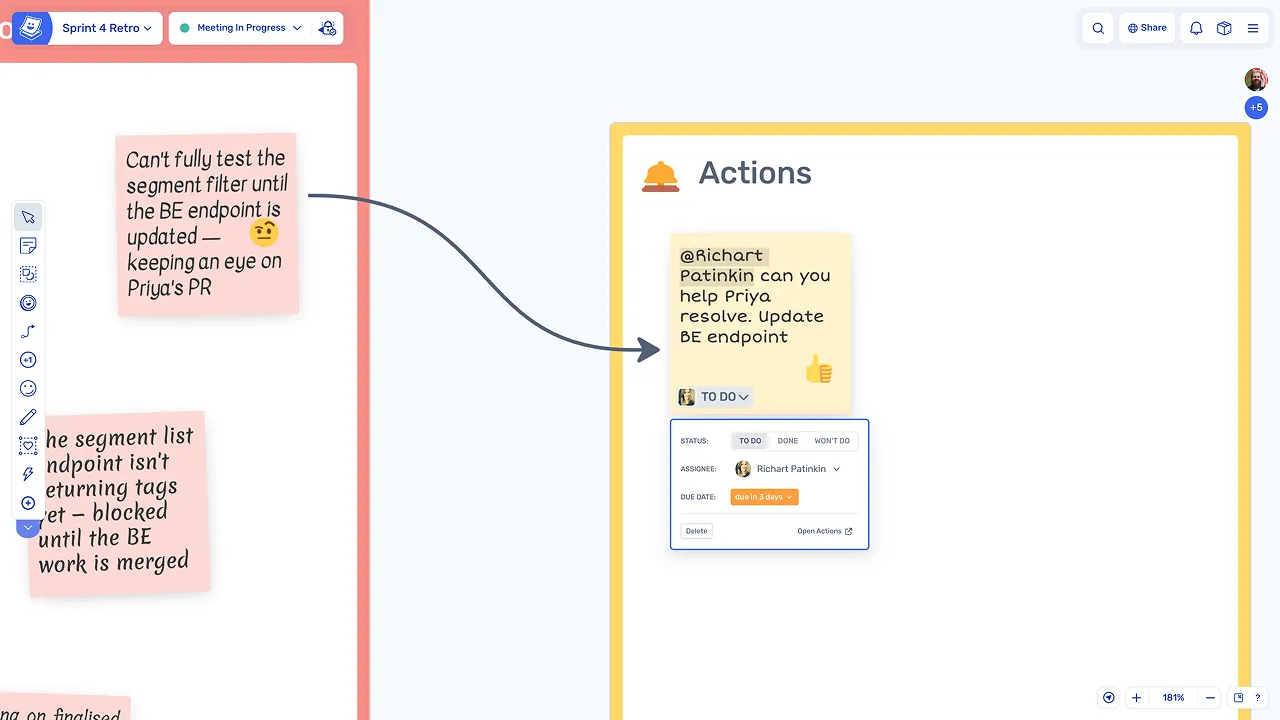
The actions stay in sync, too.
This makes it easier to start each retrospective by reviewing what the team agreed to do last time, rather than discussing the same problems all over again.
Integrations with development tools
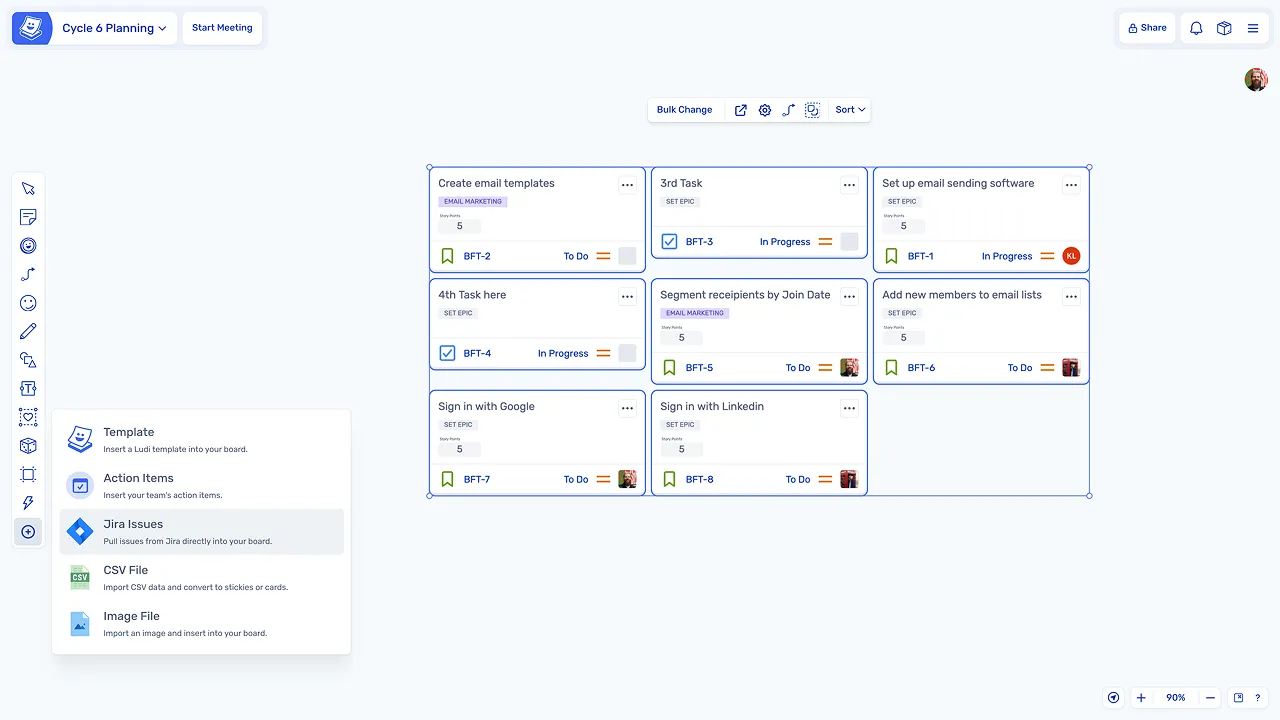
Spreo connects with Jira, Linear, and Azure DevOps, allowing teams to bring retrospective outcomes into the tools they already use to manage their work.
All three integrations support two-way synchronisation, including the ability to turn sticky notes into issues.
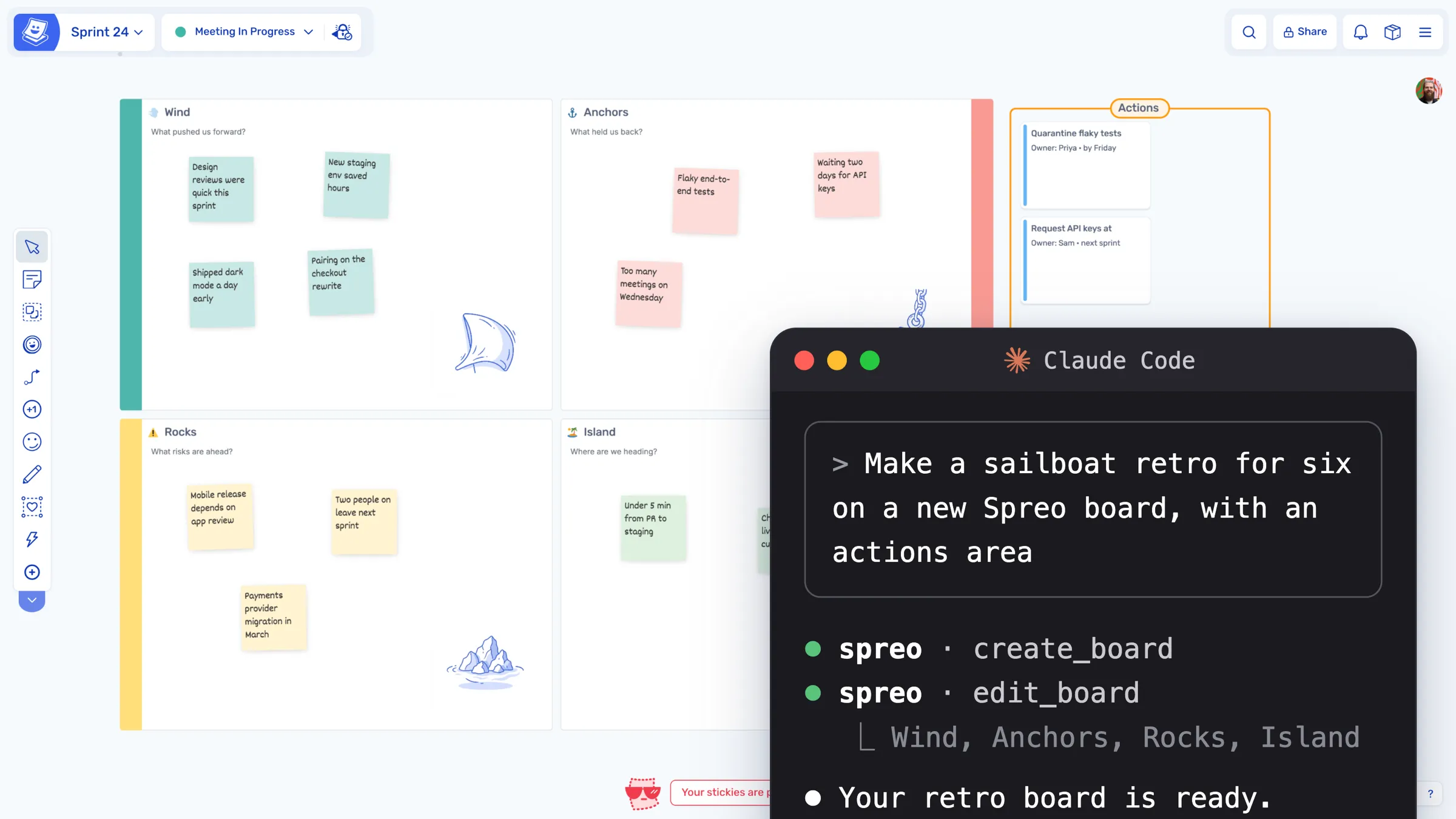
Spreo also offers an MCP server, which lets you connect AI assistants such as Claude or ChatGPT to create, edit, and summarise boards.
And, as mentioned earlier, AI can sort a board’s sticky notes into topics for you.
Making recurring retrospectives more engaging
Here’s another thing that makes Spreo a little different.
Since retrospectives happen regularly, often every sprint, it’s easy for the format to become repetitive.
Spreo tries to make those meetings a little more enjoyable.
Alongside the illustrated templates, participants can wear virtual hats, and use confetti, reactions, and interactive gadgets such as the Jukebox.
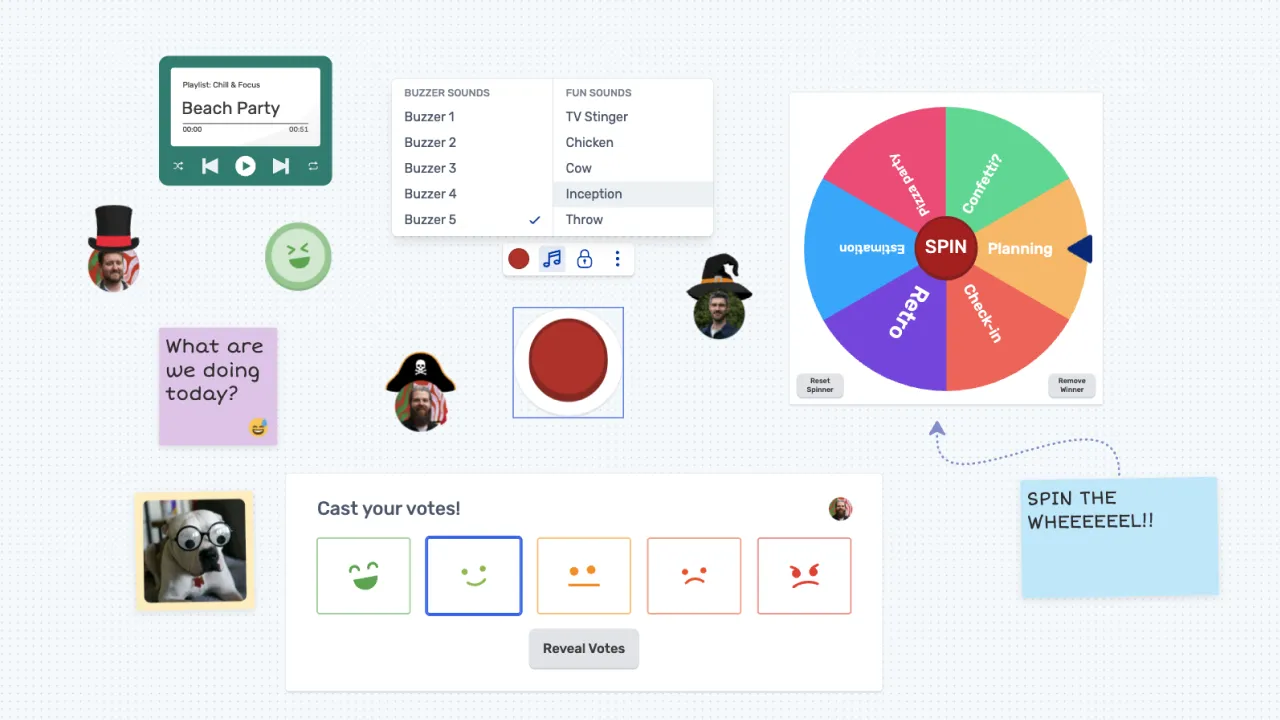
There are also interactive icebreakers with draggable objects and scales, like an energy check-in where everyone drags their photo to how they’re feeling.
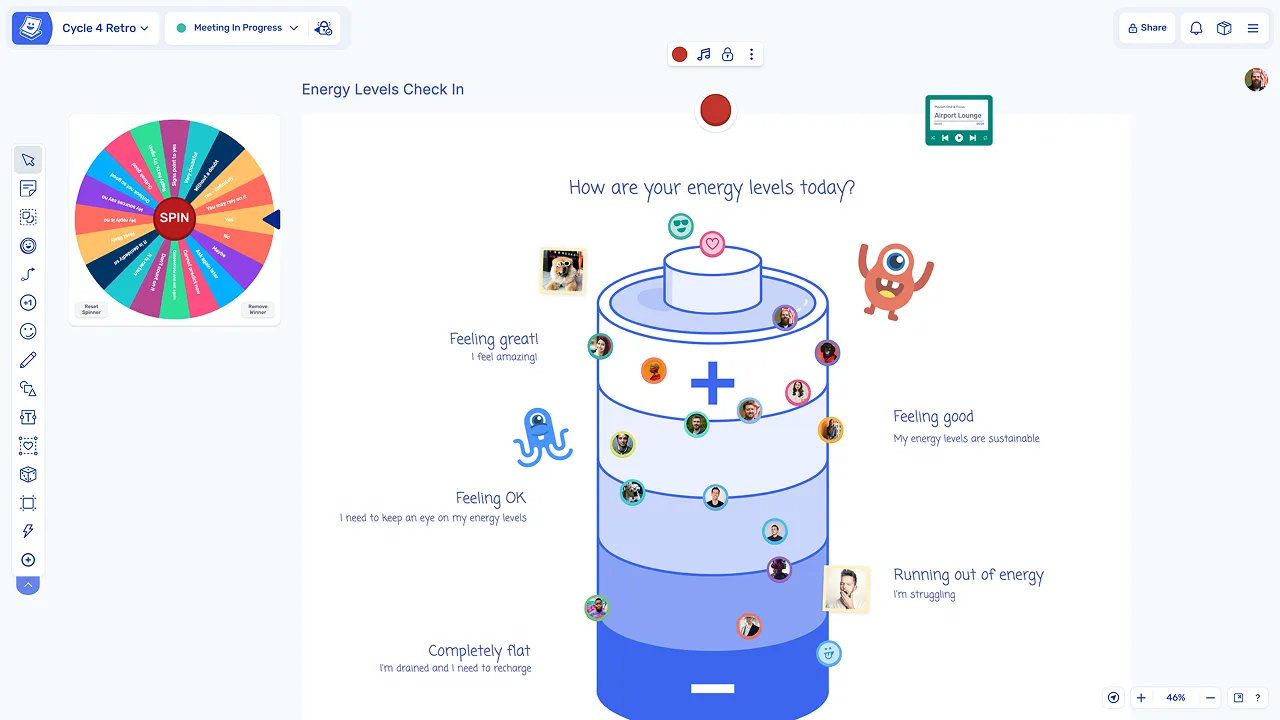
None of these features is essential to running a retrospective, of course.
But they give facilitators more ways to introduce variety and interaction into meetings that might otherwise start feeling the same every time.
Limitations to consider
There are a few things worth knowing before choosing Spreo.
- No team health trends: Although Spreo includes health check templates, it doesn’t track health scores over time. If you need to compare results between retrospectives, TeamRetro offers more functionality.
- Facilitator-led meetings: Spreo doesn’t automatically guide the team through fixed retrospective phases. You control the meeting yourself, although Activity Frames can help structure it.
- No hidden voting results in Voting Rounds: Votes remain visible as they’re cast. For blind voting, you can use the Voter gadget or a Poll instead.
- Editor licences for facilitators: Only Editors can host meetings, so teams that rotate the facilitator role will need an Editor licence for each person who hosts.
- Limited free version: Spreo Lite supports up to three participants, so most full teams will need a paid plan.
Spreo pricing
Spreo offers a free Lite version, paid Team and Consultant plans, and custom Enterprise pricing.
| Plan | Pricing | Main details |
|---|---|---|
| Lite | Free | Up to 3 people, no sign-in required. Boards stored in the browser. |
| Team: Editor | $13/user/month annually, or $16 monthly | Create boards and host meetings. |
| Team: Collaborator | $3/user/month annually, or $4 monthly | Regular team members who can access secure team boards, be tagged, assigned actions, and use integrations. |
| Team: Visitor | Free | Unlimited visitors joining individual sessions without an account. |
| Consultant | $25/seat/month | For client work, with clients joining securely as invited guests for free. |
| Enterprise | Custom | For 100+ users, with custom contracts, SLAs, and hosting options. |
For example, a team of eight with one Editor and seven Collaborators would pay $34 per month with annual billing.
There’s also a 15-day free trial of the Team plan, with no credit card required.
Overall, Spreo is best suited to agile teams that want to run engaging, interactive retrospectives on a flexible whiteboard without having to assemble all the facilitation tools themselves.
Its main strengths are private feedback collection, meeting controls, illustrated templates, and action tracking that carries improvements from one retrospective to the next.
EasyRetro: best for quick, simple column-board retrospectives
EasyRetro (formerly FunRetro) is a dedicated retrospective tool designed to make running retrospectives as straightforward as possible.
Unlike whiteboard-based tools, EasyRetro uses a simple column-based layout. You select a retrospective template, configure the board, and share a link with your team.
Participants can then add their feedback while the cards remain hidden. When everyone’s finished, you reveal the cards, group similar ideas, and let the team vote on what to discuss.
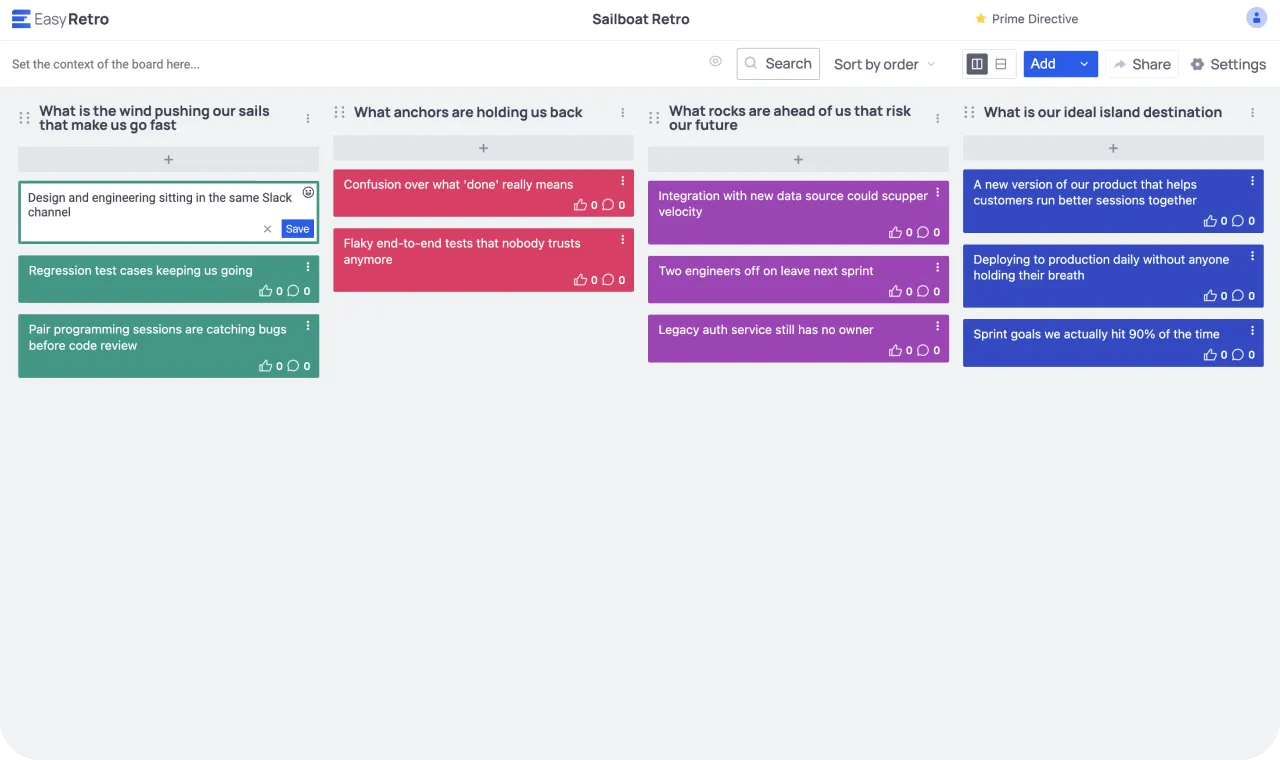
And there’s quite a bit more to it than that.
For example, EasyRetro offers 158 retrospective templates, along with the ability to create and share your own. There are also built-in timers, voting controls, and AI-assisted grouping to help organise feedback.
You can turn cards into action items, assign owners and due dates, and bring unfinished actions from previous retrospectives into the next meeting.
EasyRetro also integrates with Jira Cloud, Trello, Confluence Cloud, Slack, and Microsoft Teams.
One particularly useful aspect is how quickly you can get started. On public boards, participants don’t even need to create an account.
There are some limitations, though.
EasyRetro is built around columns, so you can’t freely arrange activities on a whiteboard. Also, anonymity isn’t guaranteed on team boards, where an administrator can reveal who wrote a card.
And while the free plan is useful for trying the software, it allows only one public board per month.
Pricing: EasyRetro offers a free plan with one public board per month. The Team plan costs $21 per month if billed annually and $25 monthly, with unlimited participants. Business starts at $50/month billed annually, and Enterprise starts at $125/month.
Retrium: best for always-anonymous retrospectives
Retrium is a dedicated retrospective platform that puts anonymous feedback at the centre of the meeting.
And that’s probably its biggest distinguishing feature.
Unlike tools where anonymity is something you need to enable, Retrium keeps contributions anonymous throughout the retrospective. There’s no setting to switch it off, and even the facilitator can’t see who wrote a particular note.
The tool also follows a structured process.
Each retrospective moves through five stages: Think, Group, Vote, Discuss, and Wrap Up.
Participants start by writing feedback privately. Once the notes are revealed, the team groups related ideas, votes on the most important topics, and discusses them before agreeing on actions.
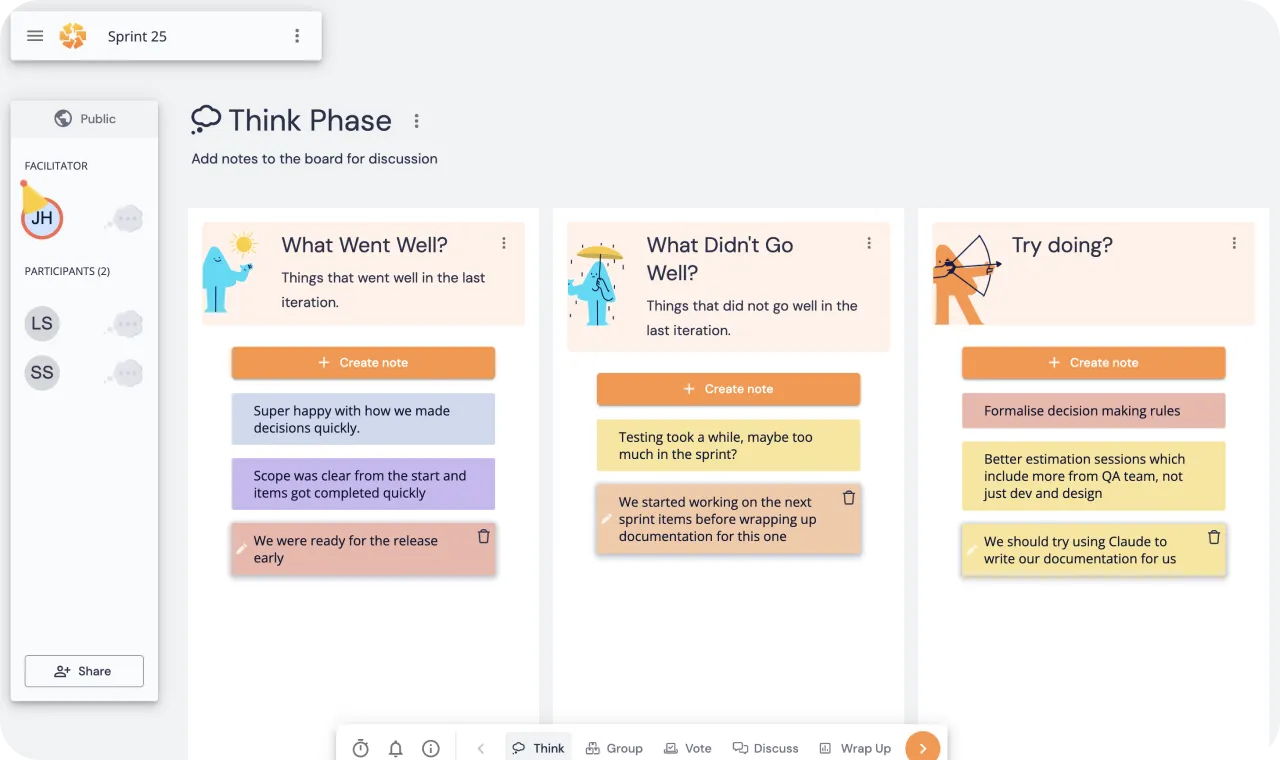
Retrium offers 11 retrospective techniques, including familiar formats such as Sailboat, Starfish, and Start, Stop, Continue.
There’s also a Team Radar feature that lets participants anonymously rate different aspects of how the team is working. The results show where opinions agree and where they differ.
Action items can be assigned owners and target dates, with a shared action plan available between retrospectives.
One thing worth knowing is that Retrium is currently developing a new version called Retrium Next.
It’s an AI-assisted retrospective platform, currently in open beta, that can interview participants privately, identify common themes, suggest discussion questions, and draft action items.
There are some limitations to consider.
The classic Retrium application focuses exclusively on retrospectives, with no free-form whiteboard or other agile meeting tools. Its latest published release note dates from August 2024.
Retrium Next, meanwhile, is still in beta, so it shouldn’t be treated as a finished replacement for the existing product.
Pricing: Retrium has no permanent free plan, but offers a 30-day trial. The Team plan costs $39 per team room per month, with unlimited users. Business costs $715 per room annually. Retrium Next is free during its open beta.
Parabol: best for a guided, step-by-step retrospective
Parabol is an open-source platform for running agile team meetings, including retrospectives, sprint poker, standups, and check-ins.
But what makes it particularly interesting for retrospectives is how much of the process it manages for you.
Instead of giving you a blank whiteboard, Parabol takes the team through a predefined sequence of activities.
After an optional icebreaker, participants privately write their feedback during the Reflect stage. The tool then moves through Group, Vote, and Discuss, with the facilitator controlling when the team progresses.
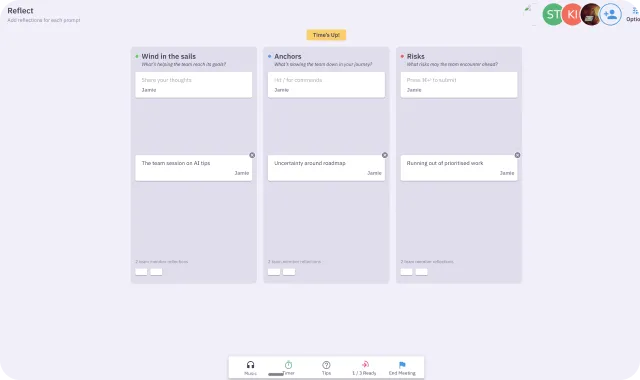
Feedback is anonymous by default, and AI can suggest ways to group similar comments.
As the team discusses the highest-priority issues, you can create tasks, assign them to participants, and send them to Jira, Linear, GitHub, GitLab, or Azure DevOps.
Parabol also keeps track of unfinished tasks, so they can be reviewed during future retrospectives or check-in meetings.
And when the meeting ends, a summary is emailed to the team, including anyone who couldn’t attend.
There are some limitations, though.
Parabol’s structured approach means you have less freedom to change the process during the meeting. For example, returning to an earlier grouping stage deletes the votes and discussion already recorded.
There’s no free-form whiteboard, either.
So, if you prefer designing your own retrospective activities, you might find its approach restrictive.
Pricing: Parabol offers a free Starter plan for up to two teams, with ten meetings per month and 30 days of history. The Team plan costs $8 per active user per month. Enterprise pricing is custom.
TeamRetro: best for tracking team health over time
TeamRetro is a dedicated platform for running retrospectives, team health checks, standups, and estimation sessions.
Like Parabol, it uses a structured approach to facilitation.
A typical retrospective begins with a review of outstanding actions, followed by brainstorming, grouping feedback, voting, discussing the results, and closing the meeting.
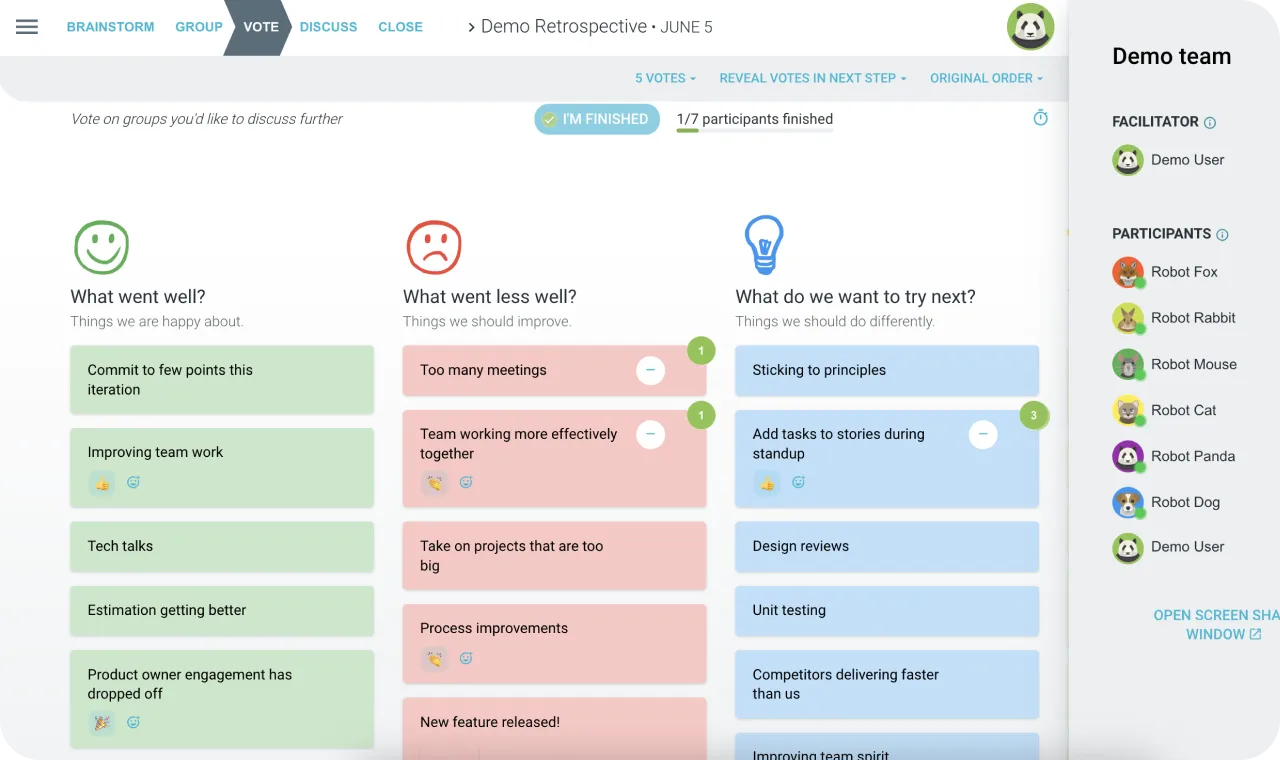
The facilitator can reorder, rename, or skip certain stages, and there are timers and presentation controls to help everyone follow the discussion.
TeamRetro also offers more than 275 retrospective templates, anonymous feedback options, AI-assisted grouping, and action tracking.
But its biggest strength is probably team health monitoring.
The platform includes more than 45 ready-made health check models, allowing teams to rate different aspects of how they’re working together.
And rather than treating each health check as an isolated exercise, TeamRetro tracks how those ratings change over time.
You can see trends for individual measures, compare results with previous checks, and, on the Business plan, compare health across different teams.
There’s also extensive support for following up on retrospective actions. Unfinished actions appear at the start of the next meeting, and integrations let you send them to tools such as Jira, Linear, Azure DevOps, and others.
Of course, there are limitations.
TeamRetro is built around predefined meeting stages rather than a fully flexible whiteboard. And while its health tracking is extensive, comparing results across multiple teams requires the Business plan.
There’s no permanent free plan, either.
Pricing: TeamRetro offers a 30-day free trial. Standard costs $250 per team annually ($25 monthly), while Business costs $350 annually ($35 monthly). Both include unlimited team members and meetings.
Miro: best for teams already running everything in Miro
Miro is a general-purpose online whiteboard that supports a wide range of collaborative activities, including retrospectives.
Unlike dedicated retrospective platforms, it doesn’t require you to follow a particular meeting structure.
You can, technically, start simple - select a retrospective template, arrange activities however you like, and use the board’s facilitation tools to guide the team through the meeting.
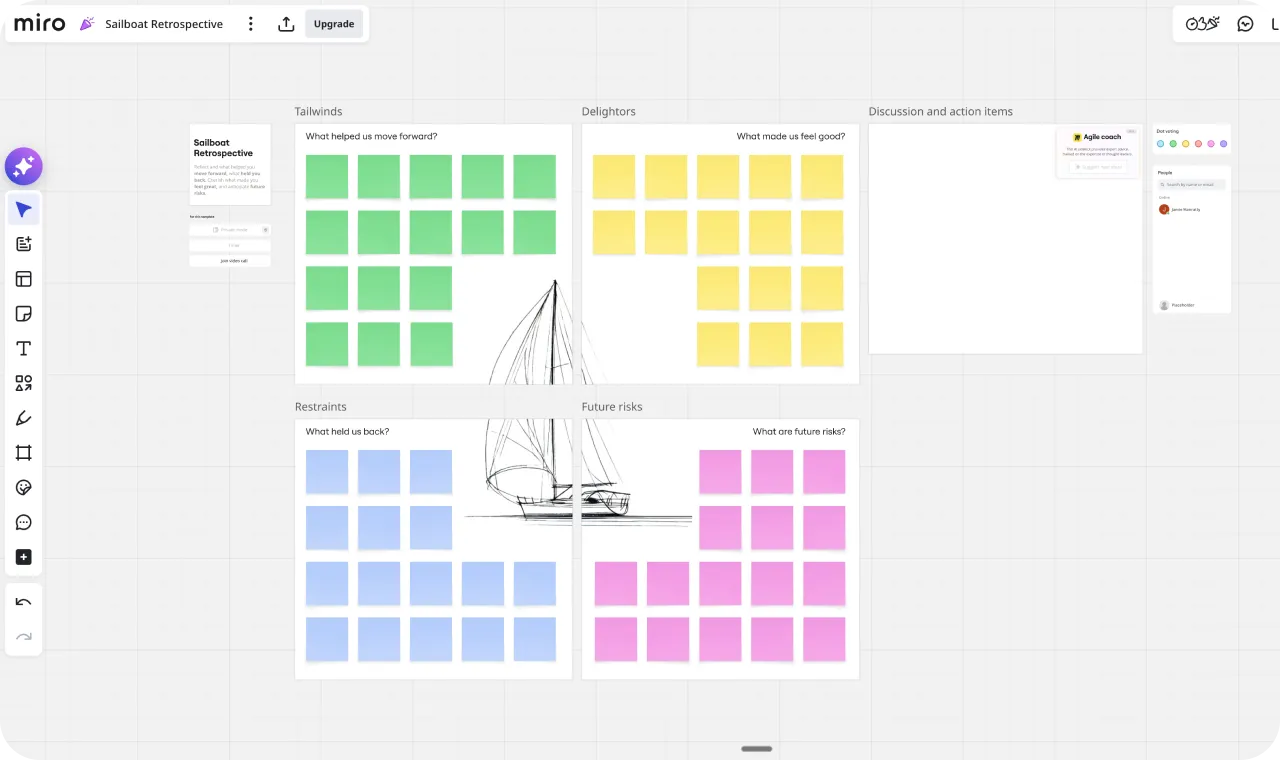
These include private writing, timers, voting sessions, and controls for bringing everyone to the same part of the board.
Miro also offers AI-assisted clustering to help organise feedback, and you can turn sticky notes into Jira issues.
One of Miro’s biggest advantages is the sheer number of available templates. Its library includes thousands of templates covering agile meetings and other collaborative activities.
However, Miro is also complex. Using Miro isn’t a streamlined experience for participants. It takes some getting used to, and as a result, it might take a while to get to a point where everyone knows which features to and not to use.
There are a few other limitations worth considering, though.
For starters, Miro’s free plan doesn’t include private mode, voting sessions, or meeting timers. You’ll need at least the Starter plan for those.
Also, while you can create Jira issues from retrospective notes, Miro doesn’t provide a documented way to bring outstanding actions from previous boards into the next retrospective.
And because Miro is designed for many different types of collaboration, setting up a retrospective may involve more configuration than with a dedicated tool.
Pricing: Miro offers a free plan with three editable boards. Starter costs $8 per member per month and Business costs $20 per member per month, both billed annually. Enterprise pricing is custom.
Which retrospective software should you choose?
Here’s a quick comparison to help you narrow down your options.
| Your main need | Best option | Why choose it | Main trade-off |
|---|---|---|---|
| Engaging, whiteboard-based retrospectives | Spreo | Flexible boards, private writing, voting, illustrated templates, and action tracking across retrospectives. | No automatic, fixed-phase facilitation. |
| Quick, simple column-board retrospectives | EasyRetro | Straightforward setup, hidden feedback cards, voting, and action tracking. | Limited to column-based layouts; anonymity isn’t guaranteed on team boards. |
| Always-anonymous retrospectives | Retrium | Permanent anonymity and a guided Think → Group → Vote → Discuss → Wrap Up process. | No free-form whiteboard or permanent free plan. |
| A guided, step-by-step retrospective | Parabol | Takes the team through predefined stages, with anonymous feedback and task follow-up. | Less flexibility to change the meeting structure or return to earlier stages. |
| Tracking team health over time | TeamRetro | Health checks, historical trends, and follow-up on outstanding actions. | No free-form whiteboard; cross-team health comparisons require Business. |
| Retrospectives in an existing whiteboard workspace | Miro | Flexible templates and facilitation tools within a general-purpose whiteboard. | Key facilitation features require a paid plan; no documented action tracking across boards. |
For a closer look, see how Spreo compares with EasyRetro, Retrium, Parabol, TeamRetro and Miro.
One thing I’d pay particular attention to is how much control you want over the meeting itself.
If you prefer a structured process where the software tells everyone what happens next, Parabol, Retrium, and TeamRetro are worth considering.
If you’d rather organise the activities yourself, Spreo and Miro give you more flexibility. EasyRetro sits somewhere else entirely, keeping things simple with its familiar column-based boards.
The other important consideration is what happens after the retrospective.
If following up on actions is your priority, pay attention to how easily the tool allows you to bring feedback and decisions into future meetings.
Because ultimately, the best retrospective software isn’t necessarily the one with the most templates or features.
It’s the one that helps your team have a useful discussion, agree on what needs to change, and actually follow through.
Frequently asked questions
What is a retrospective tool?
A retrospective tool is software that helps teams reflect on their work, identify problems, and agree on improvements for the next sprint.
Typically, participants write feedback on a shared board, group similar comments, vote on the issues they want to discuss, and turn the discussion into action items.
Some tools guide the team through each stage automatically. Others provide a flexible whiteboard where the facilitator controls how the meeting runs.
What is the best tool for remote retrospectives?
All six tools in this guide support remote retrospectives, but they approach them differently.
Spreo is worth considering if you want a flexible whiteboard with built-in facilitation controls and interactive templates.
EasyRetro is a good fit for simple column-based retrospectives, while Parabol and Retrium provide a more structured, step-by-step experience.
TeamRetro is particularly useful if you want to track team health over time, and Miro makes sense if your team already uses it for other collaborative activities.
Which retrospective tools support anonymous feedback?
Several do, but there’s an important distinction between private writing and anonymous feedback.
Private writing means participants can prepare their thoughts without everyone else seeing them immediately. It doesn’t necessarily mean their identities will remain hidden once the feedback is shared.
Retrium keeps contributions anonymous throughout the retrospective, with no option to reveal their authors.
Parabol uses anonymous feedback by default, while Spreo offers a Hide Identities option that permanently anonymises contributions made while it’s enabled.
EasyRetro also supports anonymous contributions, although administrators can reveal authors on team boards.
TeamRetro supports anonymous feedback, and Miro offers a private mode for collecting feedback before revealing it.
Which retrospective software is best for tracking action items?
If following up on improvements is a priority, look for a tool that does more than simply record action items at the end of a meeting.
Spreo lets you assign owners and due dates, track actions in a dashboard, and bring them into the next retrospective or review.
EasyRetro, Parabol, and TeamRetro also support carrying outstanding actions into future meetings.
Retrium provides a shared action plan with owners and target dates.
Miro lets you create Jira issues from retrospective notes, but it doesn’t provide a documented way to track outstanding actions across retrospective boards.
Which retrospective tools offer team health checks?
TeamRetro has the most extensive health-check functionality among the tools compared here. It includes more than 45 health models and tracks results over time, so teams can see whether things are improving.
Retrium also offers Team Radar exercises, allowing participants to anonymously rate different aspects of team performance.
Spreo includes health-check templates and tokens, but doesn’t track health scores over time.
Are there any free retrospective tools?
Yes, although the limitations vary quite a bit.
EasyRetro offers a free plan with one public board per month. Parabol has a free Starter plan for up to two teams and ten meetings per month.
Miro provides three editable boards on its free plan, although private mode, voting sessions, and timers require a paid subscription.
Spreo Lite is free for up to three participants, making it more suitable for small sessions than full-team retrospectives.
Retrium and TeamRetro don’t offer permanent free plans, but both provide 30-day trials.
Should I choose a dedicated retrospective tool or an online whiteboard?
That depends on how you like to facilitate meetings.
Dedicated tools such as Parabol, Retrium, and TeamRetro guide participants through a defined retrospective process. This can be useful when you want the software to manage the sequence of activities.
Whiteboard-based tools such as Spreo and Miro give you more freedom to arrange activities and control the meeting yourself.
EasyRetro takes a simpler approach, using column-based boards without the flexibility of a full whiteboard.
Neither approach is necessarily better. The important thing is choosing one that fits the way you and your team prefer to run retrospectives.